ITGmania Web App Controller, or “How to build a dance game kiosk without buttons”
A dance game kiosk for the home that feels like a dedicated arcade machine, controlled from the best touchscreen you already own.
Long ago, I built myself a very nice RE:Flex dance platform and have been mostly playing ITGmania on my laptop and browser games like DanceJump. It works ok for me, but I wanted something more kid and guest friendly. A proper dance game should be an in-home spectacle.
So I did it. I built the home dance game interface I actually wanted.
The project became a kiosk-style mod for the Simply Love theme in ITGmania that throws a QR code on screen. Scan the code and a phone app launches, putting them in charge of game mode and song selection.
What it feels like to use
- Game is running on the tv with a QR code displayed.
- Anyone walks up, scans, and instantly gets a “remote control”.
- Search and pick songs, view stats, pause/stop, and set modes all from your phone.
- No pedestal / arcade buttons. No keyboard / mouse / controller.
For guests and kids, this is the whole point: they already understand phones. ;)
Dance Arcade Cabinets
Let’s go back to the start and see how I got here. The typical solution is to build or buy a dedicated cabinet. I have built plenty of arcade cabinets and I really do not like how they operate dance games. The dance pad is already taking up so much space, and now you add a podium / pedestal for controls you barely touch while playing.
Modern arcade dance cabinets solve this with a touchscreen. It is easy, fast, and accurate to use.
You just walk up, select, and play. I love that.
Touchscreen Ideas
There are a couple of issues here. How do I get a touchscreen on a big TV without building a giant touchscreen? Do pc dance games even support touchscreens? (ITGmania: no, Project OutFox: yes)
Explored Touchscreen ideas
- A cheap giant touchscreen: the biggest touchscreen I could find under $200 was a used 24-inch touchscreen monitor. Not big enough.
- IR tracking wands: the idea is clever, simulate a touch surface in front of the TV. The demos I found were not convincing.
- Two screens: mirror the game to a smaller touchscreen just for selection. This feels really lame, lol.
- No touchscreen at all: step on the dance pad to navigate menus. Totally works and is done a lot, but it is clumsy and annoying. Especially with guests without patience for fiddly foot tapping around a menu.
- Phone app: the best touchscreen is already in your pocket. That’s new. Hmmmm… Winner!
Phone App
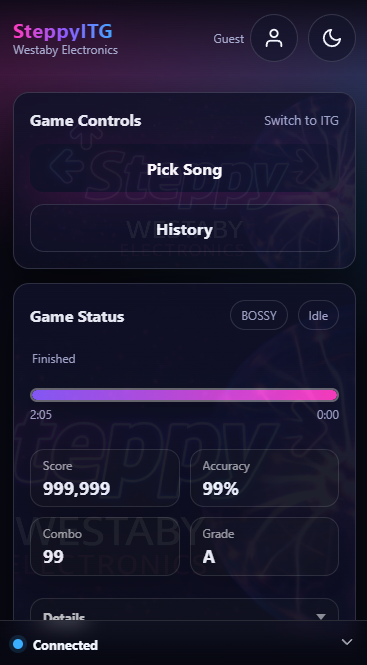
I need some minimal features to make it very easy to use. A small local webserver that syncs with ITGmania, and launches the phone app with an easy QR code.
- Search songs
- Pick songs
- View stats
- Play, pause, stop
- Select Profile
- Select Single/Versus style
Source Code for ITGmania Kiosk Mode
For the curious: here are my tests and final module code for communicating with the game, putting the game into what I call “Kiosk Mode”. Where the keyboard is no longer needed, the game boots straight to song selection and waits for the Phone App to start a song.
- https://github.com/thatdecade/ITGmania-Remote-Control-Tests
- https://github.com/thatdecade/Simply-Love-Harness-Module
- Phone App / Web Server not released (yet)
Beta Access
This is in active beta right now. The core features works. If you want to try it on your setup, email me at dustin.westaby@gmail.com and I will send you the current build.
The beta is stable but is missing some quality-of-life features I want.
- Public Webserver
- Party Mode Queue
- Cloud Profiles
